[Instagram Clone]Login Page
Updated
 Instagram Clone Coding Using HTML, CSS, and Vanilla Javascript
HTML
Head
-Add title and logo icon in title bar
<title>Westagram</title>
<link rel="icon" href="instagram.png" type="image/icon type">
-Link CSS files and Google font API
    <link rel="stylesheet" href="login.css" />
    <link rel="stylesheet" href="common.css" />
    <link rel="preconnect" href="https://fonts.googleapis.com" />
    <link rel="preconnect" href="https://fonts.gstatic.com" crossorigin />
    <link href="https://fonts.googleapis.com/css2?family=Lobster&display=swap" rel="stylesheet" />
    <link href="https://fonts.googleapis.com/css2?family=Roboto:ital,wght@0,400;1,100&display=swap" rel="stylesheet" />
Body
-Log in container
   <div class="login-container">
      <h1>Westagram</h1>
      <form></form>
      <div class="divider">OR</div>
      <div class="fb-wrapper"></div>
      <div class="forgot-wrapper"></div>
    </div>
-Log in form
      <form>
        <input type="text" placeholder="Phone number, username or email address" class="login-input" id="id">
        <input type="password" placeholder="Password" class="login-input" id="pw" onkeydown="activateBtn()">
        <button class="login-btn">Log In</button>
      </form>
-Horizontal line(divider)
<div class="divider">OR</div>
-Log in with Facebook
      <div class="fb-wrapper">
        <div class="fb">
          <a href="https://facebook.com"><img src="img/facebook.png">
            Log in with Facebook
          </a>
        </div>
      </div>
-Finding password
      <div class="forgot-wrapper">
        <div class="forgot">
          <a href="https://www.instagram.com/accounts/password/reset/">Forgotten your password?</a>
        </div>
      </div>
-Sign up div
    <div class="sign-up">
      <p>Don't have an account? <a href="https://www.instagram.com/accounts/emailsignup/">Sign up</a></p>
    </div>
CSS
-Common
* {
    background-color: #f8f8f8;
    font-family: -apple-system, BlinkMacSystemFont, 'Segoe UI', Roboto, Oxygen, Ubuntu, Cantarell, 'Open Sans', 'Helvetica Neue', sans-serif;
}

button, .icon {
    cursor: pointer;
}

form {
    background-color: #fff;
}
-Log in container
.login-container {
    height: 450px;
    width: 400px;
    border: 1px solid lightgrey;
    background-color: #fff;
    margin: 40px auto 0;
}

.login-container h1 {
    text-align: center;
    margin: 50px 0 50px 0;
    background-color: #fff;
    font-family: 'Lobster', cursive;
}

.login-input {
    display: block;
    box-sizing: border-box;
    border: 1px solid lightgrey;
    border-radius: 3px;
    background-color: rgba(250, 250, 250, 1);
    box-shadow: 0 1px #fff;
    height: 40px;
    width: 320px;
    padding: 10px;
    margin: 0 auto;
    font-size: 13px;
}

.login-input:first-child {
    margin-bottom: 10px;
}

.login-input:nth-child(2) {
    margin-bottom: 20px;
}

.login-btn {
    display: block;
    box-sizing: border-box;
    background-color: rgba(56, 151, 240, 0.3);
    border-style: none;
    border-radius: 5px;
    width: 320px;
    padding: 8px;
    margin: 0 auto;
    color: #fff;
}
-divider
.divider {
    overflow: hidden;
    text-align: center;
    box-sizing: border-box;
    color:rgb(165, 164, 164);
    font-size: 13.5px;
    font-weight: 500;
    margin: 20px 0 0 40px;
    width: 320px;
    background-color: #fff;
  }

  .divider:before, .divider:after {
    background-color: rgb(224, 221, 221);
    content: "";
    display: inline-block;
    height: 1.2px;
    position: relative;
    vertical-align: middle;
    width: 50%;
  }

  .divider:before {
    right: 2em;
    margin-left: -50%;
  }

  .divider:after {
    left: 2em;
    margin-right: -50%;
  }
-Facebook wrapper
.fb-wrapper {
      text-align: center;
      margin-top: 25px;
  }

  .fb {
    background-color: #fff;
  }

  .fb a {
      text-decoration: none;
      color: #050570;
      font-size: 15px;
      font-weight: 500;
      vertical-align: middle;
      display: inline;
      background: #fff;
  }

  .fb img {
      width: 15px;
      vertical-align: middle;
      margin-right: 5px;
  }
-Forgot password wrapper
.forgot-wrapper {
      text-align: center;
      margin-top: 25px;
  }

  .forgot {
    background-color: #fff;
  }

  .forgot a {
      text-decoration: none;
      color: rgb(107, 106, 106);
      font-size: 14px;
      background: #fff;
  }
-Sign up wrapper
.sign-up {
    height: 80px;
    width: 400px;
    border: 1px solid lightgrey;
    background-color: #fff;
    margin: 10px auto 0;
    text-align: center;
}

.sign-up p {
    box-sizing: border-box;
    margin: 30px 0 30px 0;
    font-size: 16px;
    color: #484848;
    background-color: #fff;
}

.sign-up p a {
    text-decoration: none;
    font-weight: 600;
    color: #19B5FE;
    background: #fff;
}
JavaScript
-Activate the log in button when the user filled both of the ID and Password form
function activateBtn() {
    if ((document.getElementById('id').value !== "") && (document.getElementById('pw').value !== "")) {
        document.querySelector('.login-btn').style.background = "#0096FF";
    }
}

//add onkeydown event attribute to the password input tag
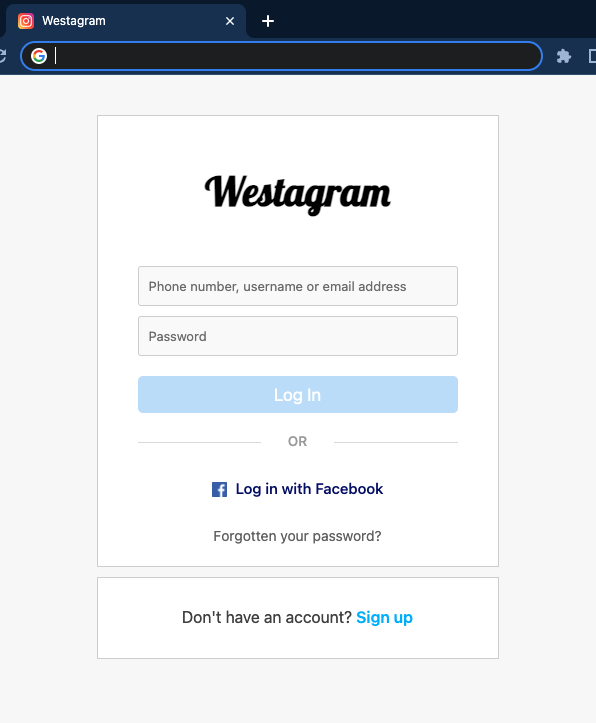
Output 👇
To Do✔️
- ID/PW Validation
- Add Footer
- Link to the main page
- Refactoring
Entire Code 👇
-HTML
<!DOCTYPE html>
<html lang="en">
  <head>
    <meta charset="UTF-8" />
    <meta http-equiv="X-UA-Compatible" content="IE=edge" />
    <meta name="viewport" content="width=device-width, initial-scale=1.0" />
    <title>Westagram</title>
    <link rel="stylesheet" href="login.css" />
    <link rel="stylesheet" href="common.css" />
    <link rel="preconnect" href="https://fonts.googleapis.com" />
    <link rel="preconnect" href="https://fonts.gstatic.com" crossorigin />
    <link href="https://fonts.googleapis.com/css2?family=Lobster&display=swap" rel="stylesheet" />
    <link href="https://fonts.googleapis.com/css2?family=Roboto:ital,wght@0,400;1,100&display=swap" rel="stylesheet" />
    <link rel="icon" href="instagram.png" type="image/icon type">
  </head>
  <body>
    <div class="login-container">
      <h1>Westagram</h1>
      <form>
        <input type="text" placeholder="Phone number, username or email address" class="login-input" id="id">
        <input type="password" placeholder="Password" class="login-input" id="pw" onkeydown="activateBtn()">
        <button class="login-btn">Log In</button>
      </form>
      <div class="divider">OR</div>
      <div class="fb-wrapper">
        <div class="fb">
          <a href="https://facebook.com"><img src="img/facebook.png">
            Log in with Facebook
          </a>
        </div>
      </div>
      <div class="forgot-wrapper">
        <div class="forgot">
          <a href="https://www.instagram.com/accounts/password/reset/">Forgotten your password?</a>
        </div>
      </div>
    </div>
    <div class="sign-up">
      <p>Don't have an account? <a href="https://www.instagram.com/accounts/emailsignup/">Sign up</a></p>
    </div>

    <script src="login.js"></script>
  </body>
</html>
-CSS
* {
    background-color: #f8f8f8;
    font-family: -apple-system, BlinkMacSystemFont, 'Segoe UI', Roboto, Oxygen, Ubuntu, Cantarell, 'Open Sans', 'Helvetica Neue', sans-serif;
}

button, .icon {
    cursor: pointer;
}

form {
    background-color: #fff;
}
.login-container {
    height: 450px;
    width: 400px;
    border: 1px solid lightgrey;
    background-color: #fff;
    margin: 40px auto 0;
}

.login-container h1 {
    text-align: center;
    margin: 50px 0 50px 0;
    background-color: #fff;
    font-family: 'Lobster', cursive;
}

.login-input {
    display: block;
    box-sizing: border-box;
    border: 1px solid lightgrey;
    border-radius: 3px;
    background-color: rgba(250, 250, 250, 1);
    box-shadow: 0 1px #fff;
    height: 40px;
    width: 320px;
    padding: 10px;
    margin: 0 auto;
    font-size: 13px;
}

.login-input:first-child {
    margin-bottom: 10px;
}

.login-input:nth-child(2) {
    margin-bottom: 20px;
}

.login-btn {
    display: block;
    box-sizing: border-box;
    background-color: rgba(56, 151, 240, 0.3);
    border-style: none;
    border-radius: 5px;
    width: 320px;
    padding: 8px;
    margin: 0 auto;
    color: #fff;
}

.divider {
    overflow: hidden;
    text-align: center;
    box-sizing: border-box;
    color:rgb(165, 164, 164);
    font-size: 13.5px;
    font-weight: 500;
    margin: 20px 0 0 40px;
    width: 320px;
    background-color: #fff;
  }

  .divider:before,
  .divider:after {
    background-color: rgb(224, 221, 221);
    content: "";
    display: inline-block;
    height: 1.2px;
    position: relative;
    vertical-align: middle;
    width: 50%;
  }

  .divider:before {
    right: 2em;
    margin-left: -50%;
  }

  .divider:after {
    left: 2em;
    margin-right: -50%;
  }

  .fb-wrapper {
      text-align: center;
      margin-top: 25px;
  }

  .fb {
    background-color: #fff;
  }

  .fb a {
      text-decoration: none;
      color: #050570;
      font-size: 15px;
      font-weight: 500;
      vertical-align: middle;
      display: inline;
      background: #fff;
  }

  .fb img {
      width: 15px;
      vertical-align: middle;
      margin-right: 5px;
  }

  .forgot-wrapper {
      text-align: center;
      margin-top: 25px;
  }

  .forgot {
    background-color: #fff;
  }

  .forgot a {
      text-decoration: none;
      color: rgb(107, 106, 106);
      font-size: 14px;
      background: #fff;
  }

.sign-up {
    height: 80px;
    width: 400px;
    border: 1px solid lightgrey;
    background-color: #fff;
    margin: 10px auto 0;
    text-align: center;
}

.sign-up p {
    box-sizing: border-box;
    margin: 30px 0 30px 0;
    font-size: 16px;
    color: #484848;
    background-color: #fff;
}

.sign-up p a {
    text-decoration: none;
    font-weight: 600;
    color: #19B5FE;
    background: #fff;
}
-JavaScript
function activateBtn() {
    if ((document.getElementById('id').value !== "") && (document.getElementById('pw').value !== "")) {
        document.querySelector('.login-btn').style.background = "#0096FF";
    }
}